

Bắt đầu tạo Cert thôi:
Tạo thư mục chứa Cert
mkdir -p /etc/certs/
cd /etc/certs
Tạo RootCA Key
openssl genrsa -des3 -out rootCA.key 2048nhập pass RootCA KEY: ví dụ: 123456
Tạo RootCA Public từ RootCA Private Key
openssl req -x509 -new -nodes -key rootCA.key -sha256 -days 3650 -out rootCA.pemNhập các thông tin như yêu cầu chú ý:
- pass key RootCA Private Key
- giá trị domain ở
Common Name: ví dụ:*.si.local
OK, vậy RootCA.pem ở trên dùng để đi Trust CA chứng thực khi cần. Tiếp tục
Bây giờ có RootCA rồi, tạo Cert từ RootCA đó để đi gắn cho Web service
tạo file openssl.cnf
vi openssl.cnf[req]
distinguished_name = req_distinguished_name
req_extensions = v3_req
[req_distinguished_name]
countryName = VN
countryName_default = VN
stateOrProvinceName = HCM
stateOrProvinceName_default = HCM
localityName = HCM
localityName_default = HCM
organizationalUnitName = BASEBS
organizationalUnitName_default = BASEBS
commonName = *.si.local
commonName_max = 64
[ v3_req ]
# Extensions to add to a certificate request
basicConstraints = CA:FALSE
keyUsage = nonRepudiation, digitalSignature, keyEncipherment
subjectAltName = @alt_names
[alt_names]
DNS.1 = *.si.localTạo file Private key
sudo openssl genrsa -out private.key 2048Từ file Private Key tạo file Signing Request
sudo openssl req -new -out cert.csr -key private.key -config openssl.cnfBây giờ có file cert.csr rồi. mang đi ra tòa ký thôi nào. Ví dụ ở đây bóc lịch 10 năm với giá trị expires 3650 days, nhớ nhập pass RootCA nhé!
sudo openssl x509 -req -days 3650 -in cert.csr -CA rootCA.pem -CAkey rootCA.key -CAcreateserial -out cert.crt -extensions v3_req -extfile openssl.cnfBây giờ đã có file private.key và cert.crt rồi thêm vào Nginx thử thôi
ssl_certificate /etc/nginx/ssl/cert.crt;
ssl_certificate_key /etc/nginx/ssl/private.key;
Kiểm tra trên web chrome
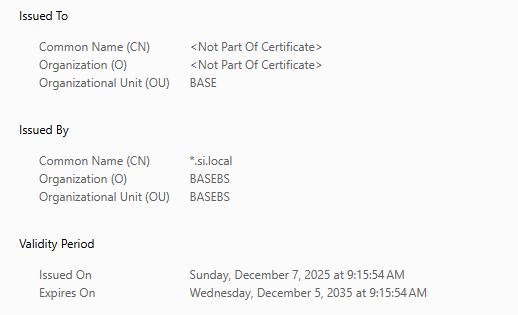
OK đã xong. bạn muốn nó xanh cỏ thay vì nó đỏ và Trust bằng cơm thì Add RootCA.pem lên Chrome nhé. này giấu ko hướng dẫn đâu.
Có Cert rồi. Bài tiếp theo là Install Gitlab nhé.
Thanks!!!
Tham khảo thêm các bài viết khác trong chuyên mục devops: https://www.adtek.io.vn/category/devops/